
The Trip Data Report provides you with all of the Miles and Hours associated with a particular Trip. The report can be grouped in a number of ways, including grouping by vehicle and trip. The report also captures Wait, Trainee, and Escort Hours, as well as Gas Gallons and Cost.
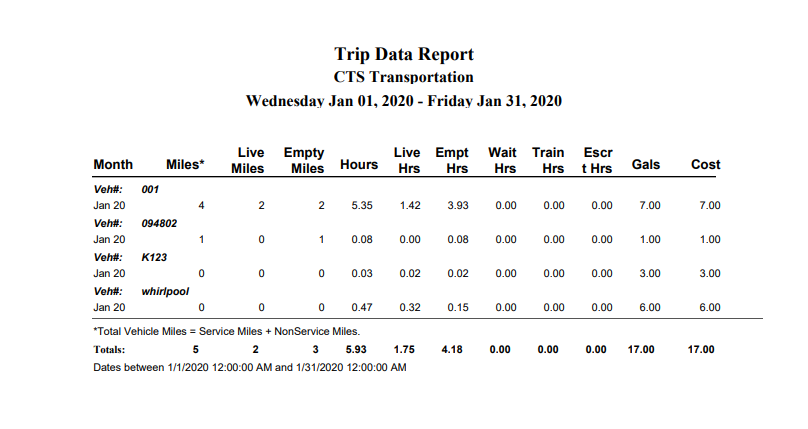
Definitions:
Month = Month and Year (Last two digits of the year)
Miles = Trip End Odometer – Trip Start Odometer this actually says *Total miles = service miles plus nonservice miles on the report
Live Miles = Last Dropoff Odometer – First Pickup Odometer
Empty Miles = (First Pickup Odometer – Trip Start Odometer) + (Trip End Odometer –
Last Dropoff Odometer)
Hours = Trip End Time – Trip Start Time Does Not Round
Live Hours = Last Off Time – First On-Time Rounding
Empty Hours = (First On-time – Trip Start Time) + (Trip End Time – Last off Time) Rounding
Wait Hours = End Wait Time – Start Wait Time Rounding
Train Hours = Trainee End Time – Trainee Start Time Rounding
Escort Hours = Escort End Time – Escort Start Time Rounding
Gallons = Gas Gallons as entered in Trip Info
Cost = Gas Cost as entered in Trip Info