Ride Data Report
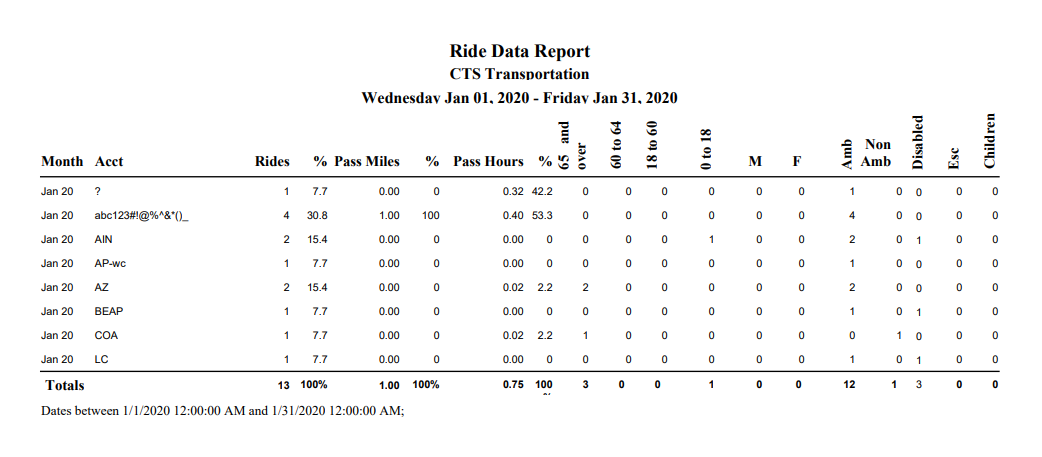
The Ride Data Report breaks down your riders for the time frame you select by age groups, sex, ambulatory/non-ambulatory, disabled, and escorts. The Ride Data Report should not be compared to the Revenue Data report because the Revenue Data report will most likely include Billable No Shows. The Ride Data report gives you specific information such as Passenger Miles and Hours, and demographic information that would not apply to a No Show. Ride Data reports on Validated Rides that Rode on Validated Trips. The Ride Data report will report on all Rides on a Validated Trip with a Ride Status of Not Validated or Rode.
*If a Ride on a Validated Trip is marked as Not Validated from Daily Schedule or from Validation but the trip isn’t resaved, the Ride Data report will still pull that Trip and all Rides into the report. If a Ride on a Validated Trip is marked as Not Validated in Validation, then saved, none of the Rides on the trip will show up on the Ride Data Report*
Definitions:
Month = Month and Year
Rides = Rides with a Status of Rode
% = Percent of total rides represented by the selected Group By option
Passenger Miles = Passenger Dropoff Odometer – Pickup Odometer from Rider Data
% = Percent of total Miles represented by the selected Group By option
Passenger Hours = Passenger Dropoff Time – Pickup Time from Rider Data
% = Percent of total Hours represented by the selected Group By option
65 and Over = 65 and Over based on Date of Birth as Entered in Rider Master
60 – 64 = 60 – 64 based on Date of Birth as Entered in Rider Master
18 – 60 = 18 – 60 based on Date of Birth as Entered in Rider Master
0 – 18 = 0 – 18 based on Date of Birth as Entered in Rider Master
M = Number of Male based on Gender as Entered in Rider Master
F = Number of Female based on Gender as Entered in Rider Master
Amb = Number of Ambulatory: Mobility as denoted in the Reservation
Non Amb = Number of Non-ambulatory: Mobility as denoted in the Reservation
Disabled = Number of Disabled: Special Assistance is marked True or False for
Disability in Master
Esc = Number of Escorts
Children = Number of Children
Ride Status Report
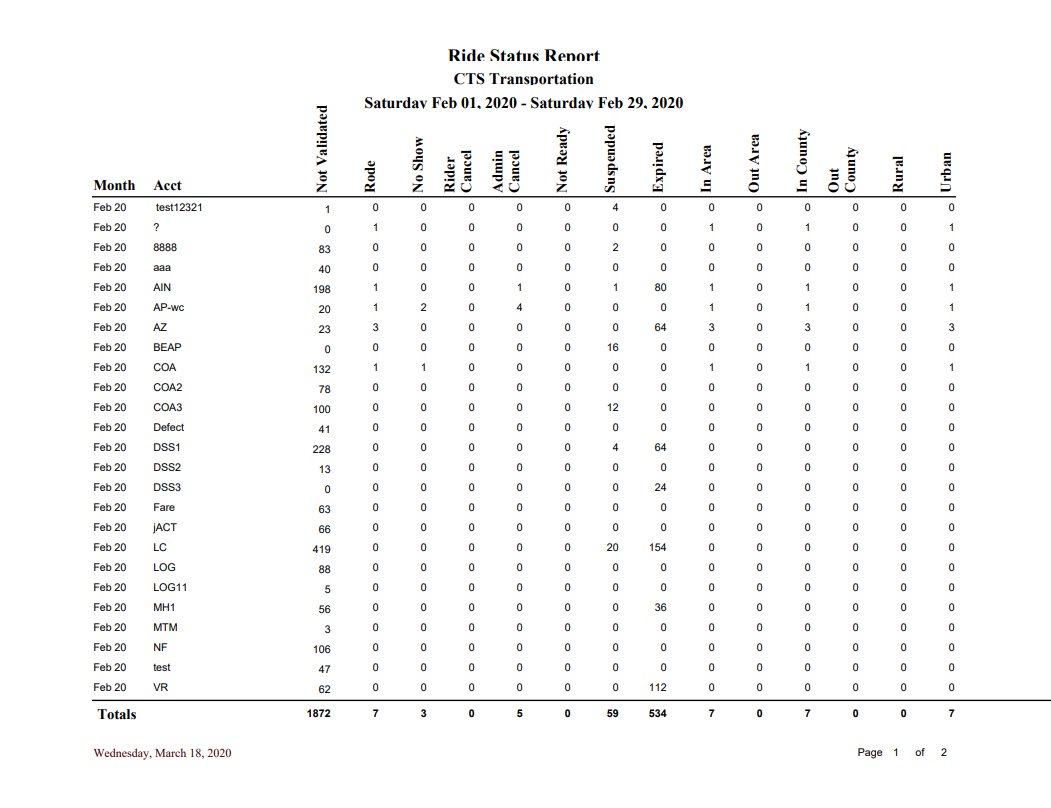
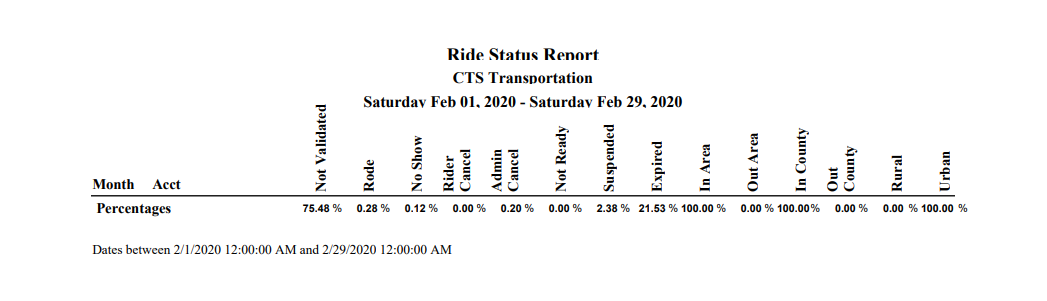
The Ride Status report pulls the Rider’s Status both from validated and Un-validated trips, with Validated and Un-validated Rides. The first column of this report gives you the Month and Year, while the second is whatever Group By has been used. The third column, to the left of Rode, is a total of all Un-validated Rides. The other columns are pretty straightforward, from left to right totals for each Status including Rode, No Show, Rider Cancel, Admin Cancel, Not Ready, Suspended and Expired. Like the Management Statistics report, the report also gives you the totals for In/Out Area, In/Out County, and Urban/Rural. Again, these are selected from the individual Reservations themselves.
Ride Detail Report
The Ride Detail Report should not be compared to the Revenue Data report because the Revenue Data report will most likely include Billable No Shows. The Ride Detail reports on Validated Rides on Validated Trips. This report is different than some of the other Ride reports in that you only have a Provider Filter and can only Group By Account, which most will use, or Agency. Once you select the appropriate accounts you can choose between Report 1 and Report 2.
*If a Validated Ride on a Validated Trip is marked as Not Validated in Daily Schedule, The Ride Detail Report will still show all other Validated Rides, but not the one marked Un-validated. If you go back and Validate the Pickup and Dropoff from Daily Schedule, the Ride will reappear on the report. If you do the same in Validation, it does the same whether you Save or not. It behaves the same way for Report 1 and 2.*
Definitions:
Ride Detail Report 1
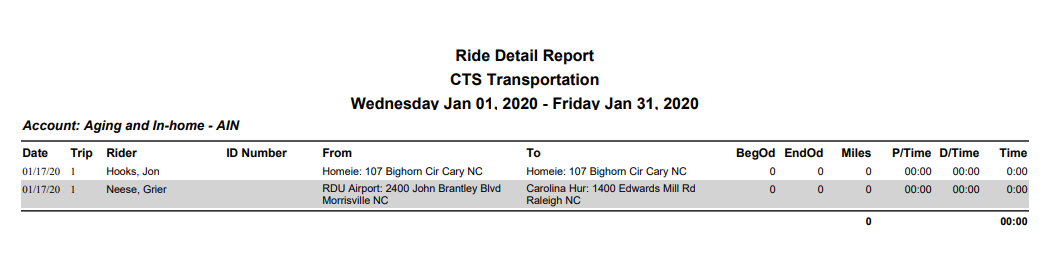
Date = Date of Ride
Trip = Trip Number associated with Ride
Rider = Rider Name
ID Number = SS#
From – Origination Address
To – Destination Address
BegOd = Passenger Pickup Odometer from Rider Data
EndOd = Passenger Dropoff Odometer from Rider Data
Miles = Passenger Dropoff Odometer – Pickup Odometer from Rider Data
P/Time = Passenger Pickup Time from Rider Data
D/Time = Passenger Dropoff Time from Rider Data
Time = Passenger Dropoff Time – Pickup Time from Rider Data
Totals at bottom equal Total Miles and Total Hours
Ride Detail Report 2
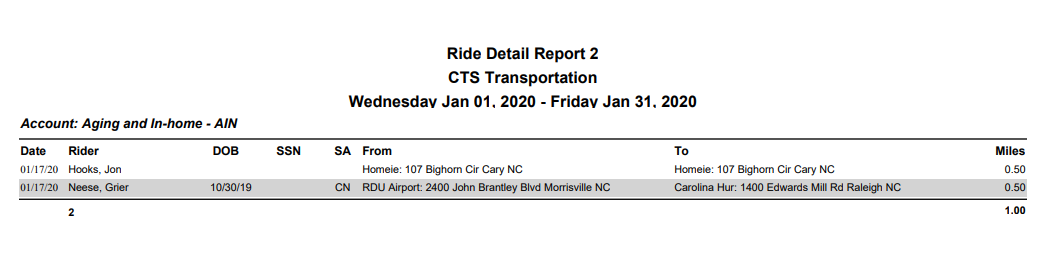
Ride Detail Report 1 and 2 show you details about the riders of specific accounts including pickup and drop-off odometers and times in Report 1 or mileage in Report 2.
Date = Date of Ride
Rider = Rider Name
DOB = Date of Birth from Rider Master
SSN = SS#
SA = Special Assistance from Rider Master
From = Origination Address
To = Destination Address
Miles = Passenger Dropoff Odometer – Pickup Odometer from Rider Data
No Show Report
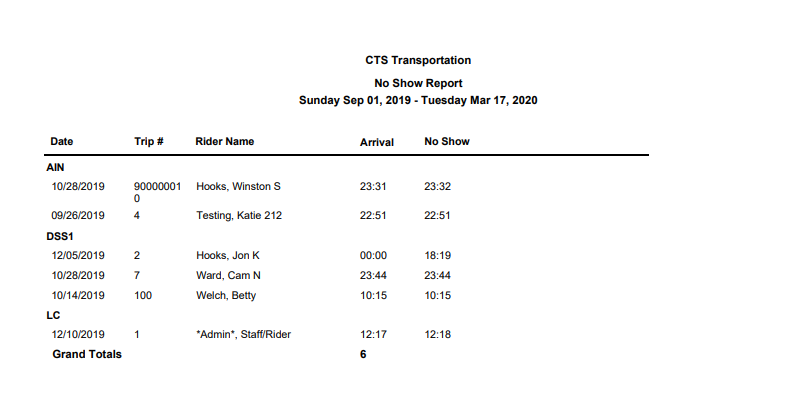
The No Show Report is pretty straightforward, showing you any Rider with a Validated Status of No Show, Not Ready, Not Present, or Client Cancel at Door, on completely Validated Trips. This report groups the No Shows by Account.
Definitions:
Date = Date of the Scheduled Reservation
Trip # = Trip Number
Rider Name = Rider Name
Arrival = Only Set from Mobile Data Terminals (MDT)
No Show = Time User Marked the Reservation as a No Show or Set by MDT
Grand Totals = Total Number of No Shows
New/Unduplicated Riders Report
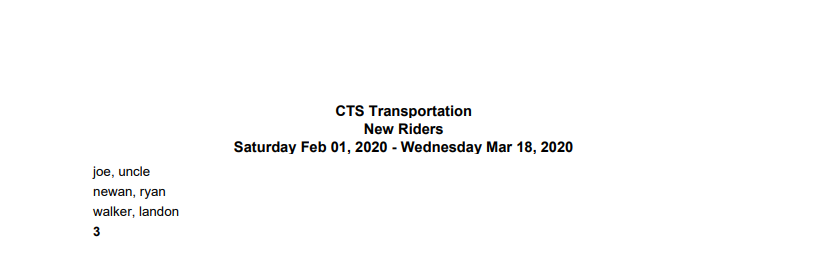
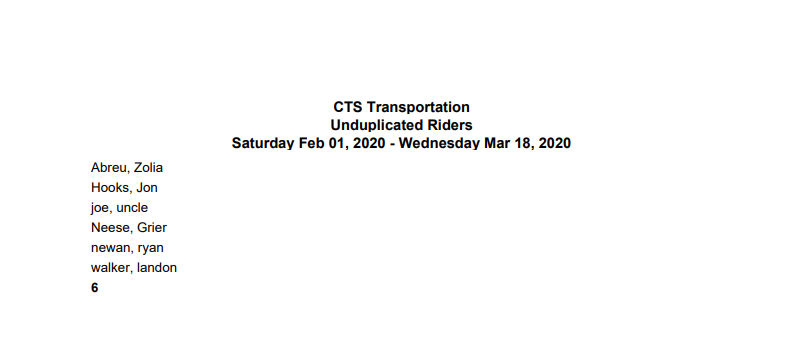
This report will provide you with two different options, New Riders and Unduplicated Riders, and each option can be grouped by Account if selected from the dropdown for a given period. If a Rider is marked as Rode on a completely Validated Trip, and they are new to the system, they will show up on the New Rider/New Rider by Account reports, 1 time. The report also totals the number of new Riders for the given period, at the bottom. An Unduplicated Rider is any Rider that has been marked as Rode at least one time on a Validated Trip but could have many reservations marked as Rode, during a specified date range. The report is meant to show you only who Rode, not how many times they Rode, and this report also gives a total at the bottom as the New Rider reports.
Rides By Purpose Report
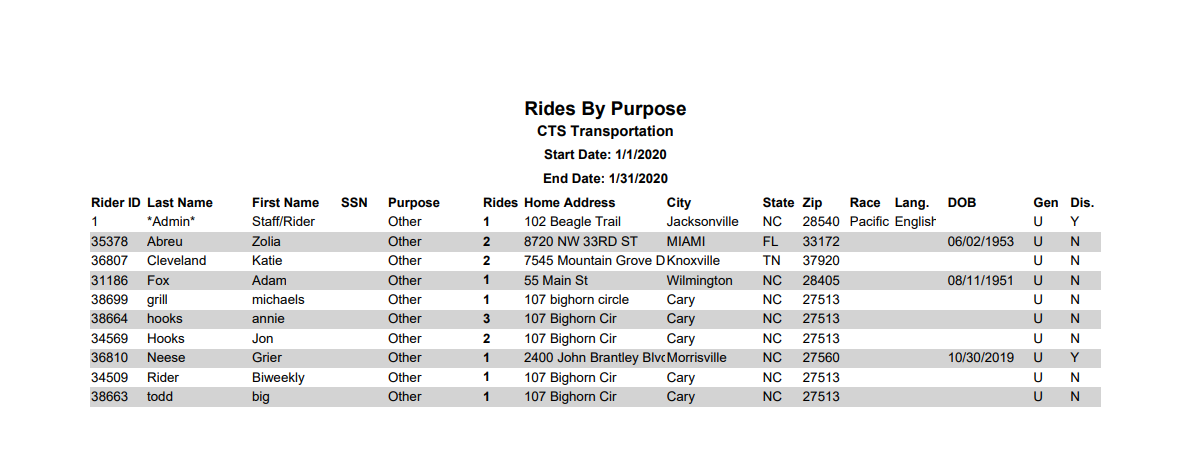
The Rides by Purpose report will show you all Validated Rides, regardless of status, on completely Validated Trips. If a particular Rider does not have a Purpose selected within the Reservation, it will show up as Other on the report. If a Rider has multiple rides for the same purpose, it will be counted in the Rides column, instead of a separate line. The report also indicates the Gender (M, F, and Unspecified) and whether or not the Rider has a Disability (Y/N), which is set in your Special Assistance master. You can also elect to see only Rides with a Priority on the Pickup, or Drop-off, as set within the Reservation.
*The Header of the report is customizable, allowing you to enter the text you would like to appear on the report, to accurately describe the data you are reporting on.*
Encounter Data Report
Data Dump Report
The Data Dump Report exports all ride data for a selected date(s) into an excel spreadsheet.
Rides for Rider by Day Report
The Rides for Rider by Day exports into excel rider data and which days in the month they
rode.
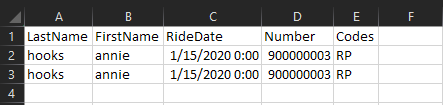
Site Code Duplicates Report
The Site Code Duplicates Report looks for instances where the pickup site code is the same as the
drop-off site code.
Codes include: H-hospital, R- residence, N-nutrition, D-dialysis, C-clinic, L-lab, Other, P-physician.
Ride Demand by Interval Report
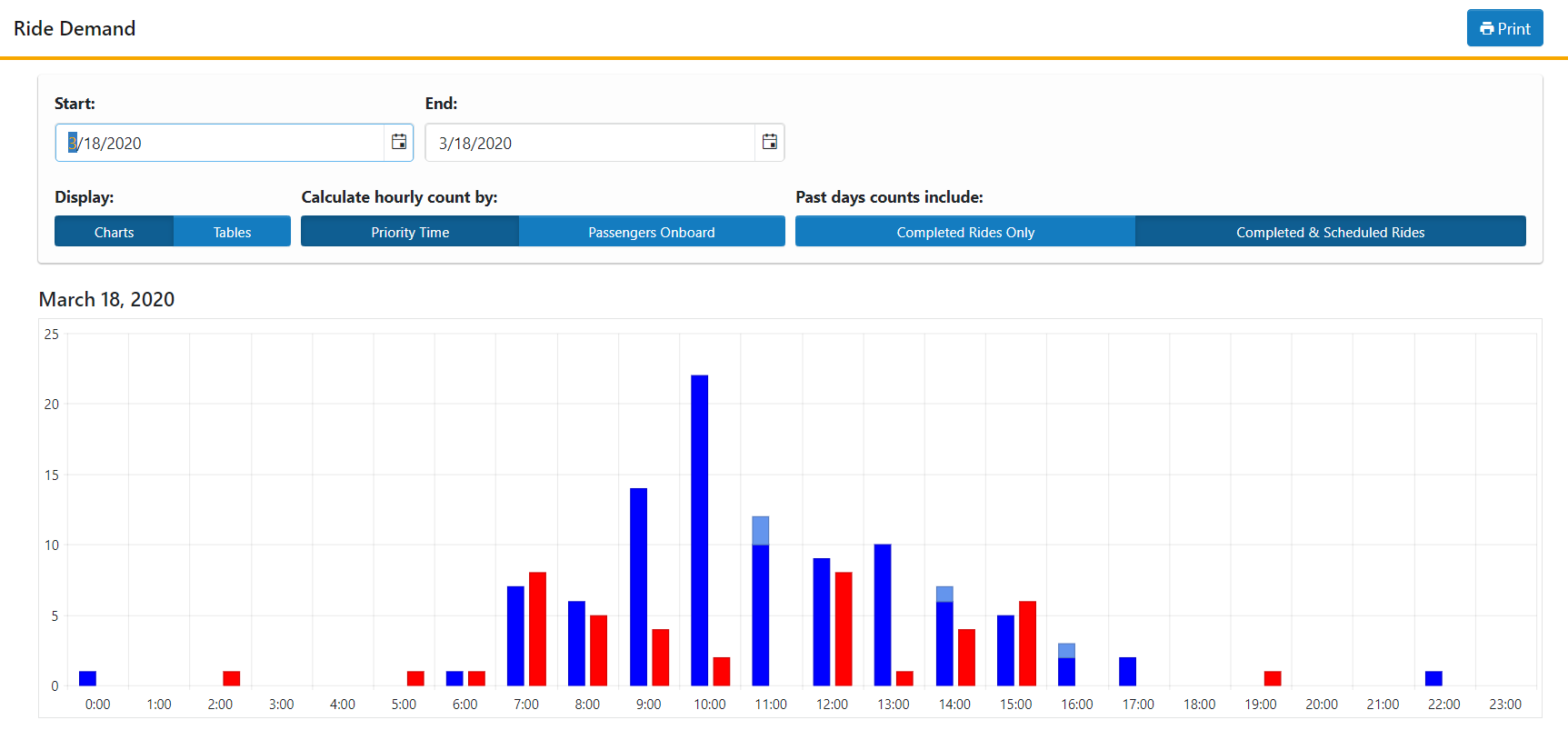
Charts Example
Tables Example