
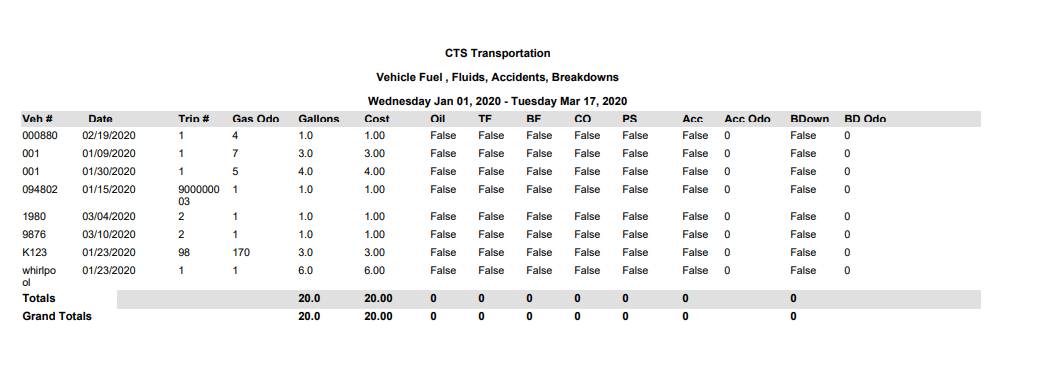
Vehicle Fluids Report
The Vehicle Fluids Report provides information on vehicle fuel, fluids, accidents, and breakdowns for the
selected date(s). The fluids report includes Gas odometer, gallons, cost, accident, accident odometer,
breakdown, and breakdown odometer.
Vehicle Utilization Report
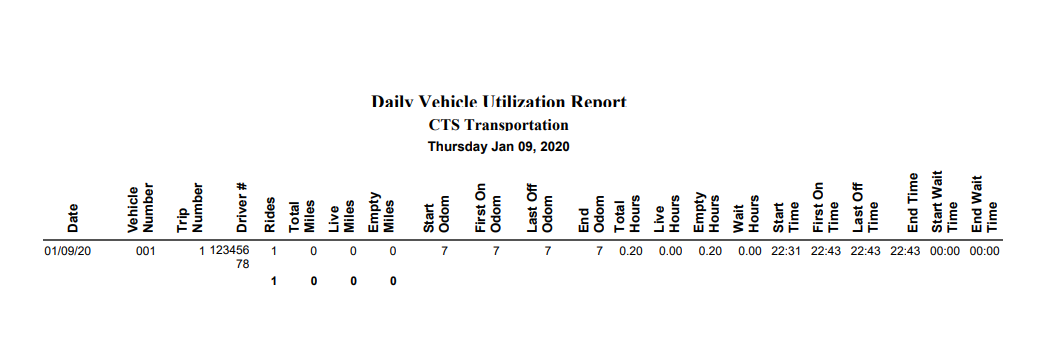
The first thing to point out on the setup of the Vehicle Utilization report is Max Miles which, as you will notice, defaults to 300, but can be changed. Any trips exceeding the value used for Max Miles, once the report is generated, will be flagged in red. This serves as an Audit, allowing you to quickly recognize unusually long trips, and can help you quickly identify data entry issues that may be causing your Validated Mileage to be off on reports. There is also a Summary checkbox that allows you to only see the totals, and this can be grouped by Trip or Vehicle as well. It is important to note that the information shown on the Vehicle Utilization report reflects the numbers from Riders with any status other than Not Validated on completely Validated trips.
Definitions:
Date = Trip Date
Vehicle Number = Vehicle Number
Trip Number = Trip Number
Driver # = Driver ID
Rides = Total Number of Riders with any status other than Not Validated on Completely
Validated trips
Total Miles = Trip End Odometer – Trip Start Odometer
Live Miles = Last Dropoff Odometer – First Pickup Odometer
Empty Miles = (First Pickup Odometer – Trip Start Odometer) + (Trip End Odometer - Last Dropoff Odometer)
Start Odometer = Trip Start Odometer
First On Odometer = First On Odometer
Last Off Odometer = Last Off Odometer
End Odometer = Trip End Odometer
Total Hours = Trip End Time – Trip Start Time
Live Hours = Last Off Time – First On Time
Empty Hours = (First On-time – Trip Start Time) + (Trip End Time – Last off Time)
Wait Hours = End Wait Time – Start Wait Time
Start Time = Trip Start Time
First On-Time = First On Time
Last Off Time = Last Off Time
End Time = Trip End Time
Start Wait Time = Start Wait Time
End Wait Time = End Wait Time