
Employee Times Report
The Employee Times Report is pretty straightforward, providing you with the Date and Trip Number, and all of the specific times in which various activities occurred. If there is no Trip Number, then the times where added under Utilities, to Clerical Time or Admin Miles. Both Clerical and Admin times are displayed under the Clerical Start Time and Clerical End Time columns but will be located on separate rows. So, basically, the Employee Times Report provides you with the times used to calculate the totals on the Employee Hours Report.
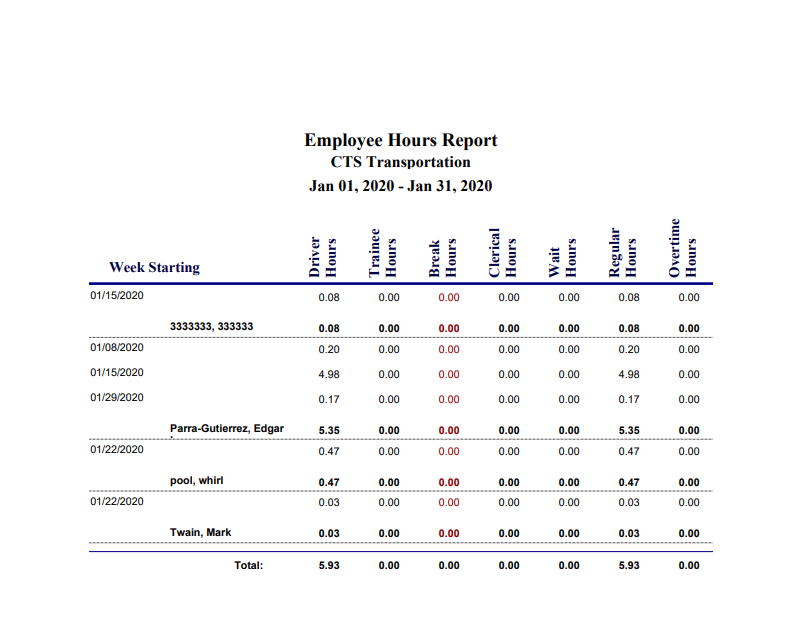
Employee Hours Report
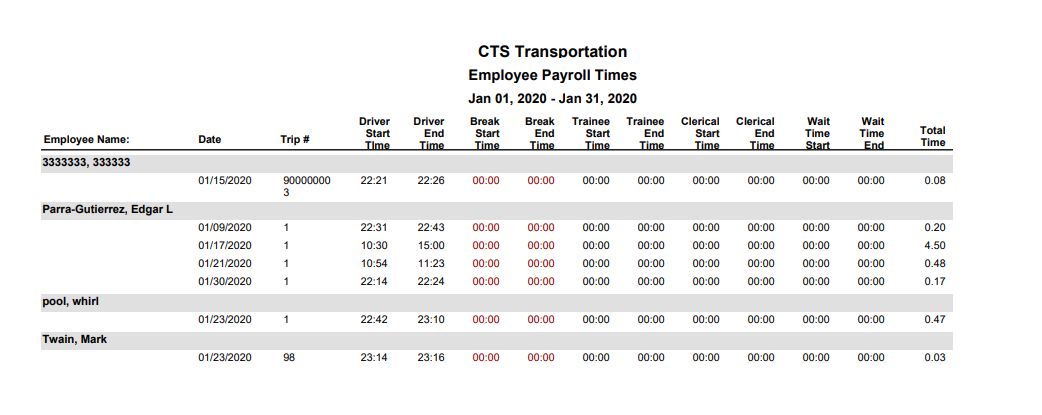
Definitions:
Driver Hours = Trip End Time – Trip Start Time
Trainee Hours = Trainee End Time – Trainee Start Time
Break Hours = Break End Time – Break Start Time
Clerical Hours = (Clerical End Time – Clerical Begin Time) + (Admin End Time – Admin Begin Time)
Wait Hours = Wait Time End – Wait Time Start
Regular Hours = Total of All Hours up to 40 Hours
Overtime Hours = Total of All Hours over 40